.jpg?type=w966)
When writing blog posts, one thing you always check at the end is the length of the draft. If it’s too short, the content might seem insufficient compared to the search intent; if it’s unnecessarily long, the reading flow can feel heavy. That’s why it’s a good habit to use a character count tool to review your overall length and paragraph structure before finishing your writing.
Direct Link to Naver Character Count Tool
Naver blog drafts often mix titles, main text, image captions, hashtags, and CTA phrases. Even if the draft feels long while writing, the actual body text might be shorter than expected. On the other hand, repeating the same keyword multiple times can make the writing feel stuffy. Today, I’m introducing a character count page available on Chunchoo’s IT site. * Recently built using the popular Vibe Coding.
Checking Character Count When Finishing a Blog Draft

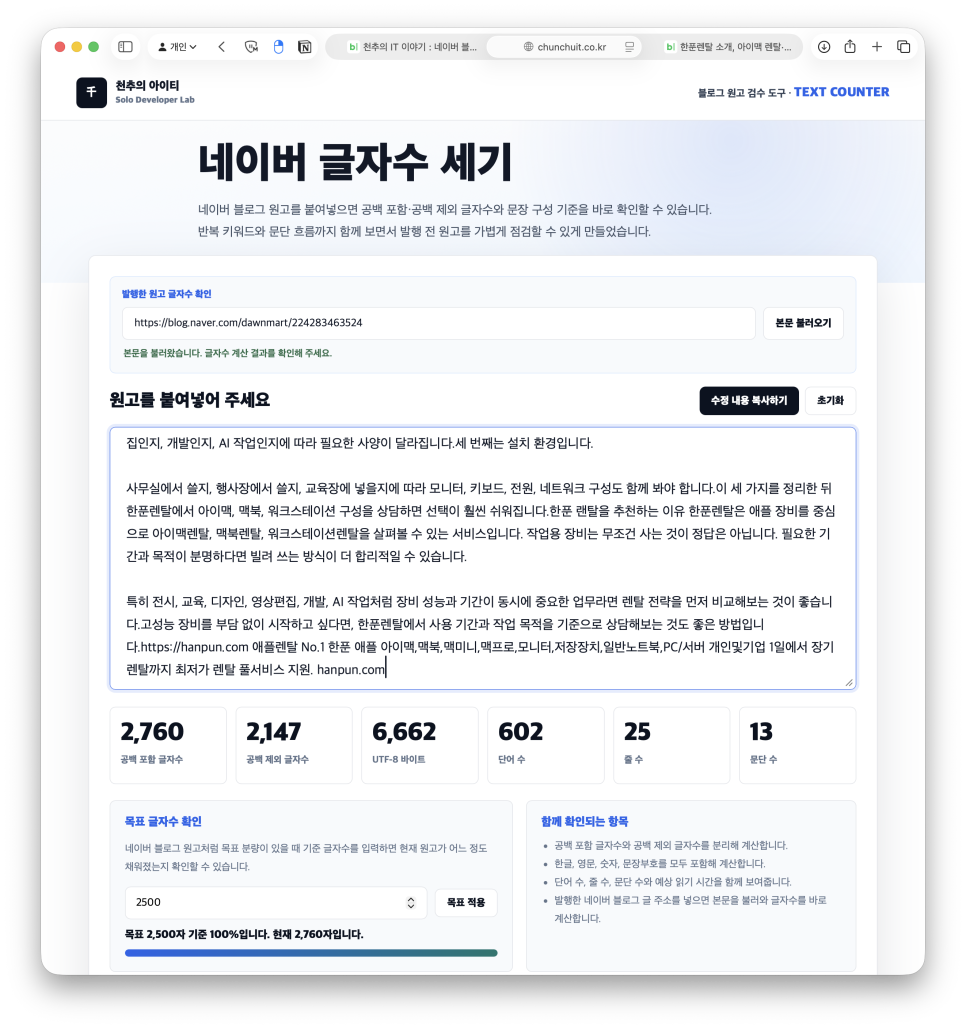
Naver Character Count is a tool you can open and use right away. Just paste your draft and the numbers update instantly—there’s no need to install any software. It’s useful not only for blog drafts but also for website copy, advertisements, and notices where the length needs to be controlled. The interface is simple: when you paste the text into the input box, it shows character count including spaces, character count excluding spaces, UTF-8 bytes, word count, line count, and paragraph count. While many writers focus only on character count including spaces, checking paragraph and line counts helps manage reading flow more effectively.
Comparing Character Counts With and Without Spaces

The content used for this post
Even for a draft of 2,500 characters, a text with many spaces and one written densely will feel different to readers. If you judge only by the character count including spaces, you might miss if paragraphs are too broken up or sentences run on too long. This tool shows both numbers separately, making it easier to grasp the actual density of your draft. For example, if you want your blog post to be around 2,500 characters, you can enter your target count and track your progress. Rather than guessing how many characters are missing mid-writing, you can immediately see how far you’ve come toward the goal, which is very convenient.
Importing Body Text via Blog URL

While pasting text directly works well, the URL import feature is more convenient when reviewing already published posts. If you enter the URL of a public Naver blog, cafe post, or website, the tool fetches the body text and recalculates it. This is handy for checking the actual post length after publishing or refining existing content. Keep in mind that private or login-restricted posts can’t be fetched automatically. In these cases, copy and paste only the body text from the editing screen into the input box. Importantly, instead of pasting titles, tags, and image captions all at once, focus on the actual body text your readers will see.
Checking Repeated Keywords to Improve Blog Quality

One feature I like on this page is the morphological analyzer. It filters out particles and common expressions and separately lists nouns repeated five or more times. While including key SEO terms is necessary, overusing the same words can make your writing feel unnatural. From experience in blog marketing, achieving natural repetition is often harder than inserting keywords. Keywords need to be included, but repeating the same word in every sentence quickly tires readers. The keyword list makes it easy to spot which words are overused at a glance.
Useful for Checking Typos and Expressions Too

Meeting your character count alone doesn’t mean the draft is finished. The page also highlights frequently misspelled words, suspicious spacing, and phrases that should be standardized. When writing blogs repeatedly, it’s easy to fall into repetitive expressions, so this step helps elevate the quality of your post. Especially for website copy or notices where trust matters, even a small typo stands out. Don’t publish immediately after finishing your draft—check the character count and expression errors together, and you’ll spot needed corrections much faster.
It’s Easier to Use After Writing Your Draft
While writing, I recalled something I often forgot in planning—the missing copy-paste during design. I prefer to finish the overall flow of my draft first without worrying about word count, then check it at the end. When you paste your draft into the tool at that point, it’s easier to decide whether you need to stretch parts or cut repetitive sentences. Seeing paragraph count and estimated reading time together also helps gauge whether readers can comfortably read through to the end.
When Should You Use This Tool?

If you consistently manage your blog post length, this tool is worth checking out. It fits well for sponsored posts, informational articles, or website-style blog posts where both length and keyword flow matter. For daily writers, this small tool can significantly reduce your deadline stress. On the other hand, for quick memos or personal diaries where length doesn’t matter, frequent checks aren’t necessary. However, if your post is written with search traffic in mind, simply pasting it here before publishing lets you check paragraph lengths, repeated phrases, and reading time. In summary, this tool is less about helping you write longer and more about cutting unnecessary repetition and checking your draft’s condition. Keeping the character count page open as a habit lets you organize your blog drafts based on hard numbers and flow rather than guesswork.